Breaking Free from Corporate Overlords


I started my homelab in June of 2024, when I found myself with an increasing desire to self-host my content, and stop paying for subscription services for backing up my data–in essence, break free from the corporate overlords that keep us trapped paying their subscriptions each month.
In hindsight, I've essentially taken on another full-time job as a server admin - but the upsides cannot be overstated. I am free from the corporate overlords.
So, what did I start with? If your goal is to break free from the storage hosting platforms, then you can really start with anything from a Raspberry Pi to a Synology DiskStation, but being the tinkerer that I am, I opted to spec out my own NAS and build it myself.
Here's what I ended up with:
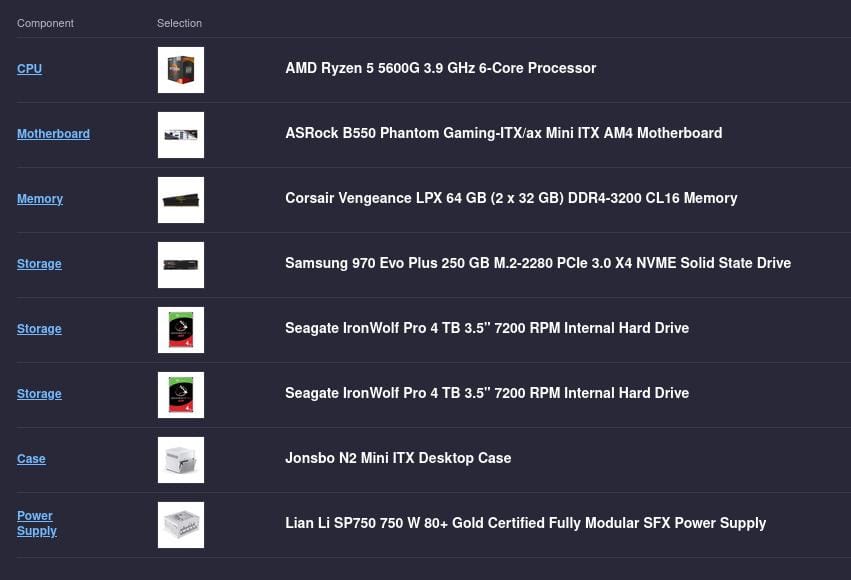
The Ryzen 5 5600G offers decent performance at a respectable 65W TDP, and comes in reasonably cheap at just over £100. Two Seagate IronWolf Pros at 4TB in a RAID 1 configuration seemed like a decent compromise for not wanting to spend too much, but having enough storage to get me started.
The Jonsbo N2 Case offers a respectable five drive bays and whilst does come in looking a bit like a dehumidifier, does the job well with not taking up much horizontal space.
Handling Everyday Data
For years, I've been using the OneDrive desktop client to back up all of my files–from the Desktop to Documents to the Downloads folder–all in the name of having the same files available across all of my machines. So what better place to start than looking for a solution to that?
At first, I toyed with the idea of just dumping those files directly into an SMB share and calling it a day, but the beauty of having something like OneDrive is the ease of access from any kind of device (Yes, I know you can access SMB on both Android and iOS).
Then I explored options like OpenCloud or Nextcloud. On the surface OpenCloud seemed pretty neat, and I do like the mission, but ultimately it's missing the cross-platform apps that I so desperately want. So I settled on Nextcloud. It offers a decent experience in the browser, and the mobile app on iOS is honestly even better. The desktop sync app is easy to use and works on Windows, Linux and macOS, all of which I use regularly.
One thing to note: the desktop sync app would often fail to upload large files, either due to hitting the PHP file size limit (which defaults to 512MB?!) or timing out from the max execution time.
Handling Photos
When I first started looking into self-hosting my photos, I did consider just using the Nextcloud setup I already had. But then I came across the web app PhotoPrism. It seemed pretty powerful, with features like object and face recognition that would make managing my library much easier.
However, when it came to syncing from mobile, I realised it didn’t have a dedicated app–but along came Immich to save the day!
Immich boasts an intuitive design that will feel familiar to anyone who has used Google Photos, excellent facial recognition accuracy, link sharing for images and a polished companion app that automatically backs up your assets–among a host of other features.
The Verdict
Is starting a homelab cheaper than just paying for subscriptions? Probably not. Is it easier? Definitely not. But is it worth it? Absolutely–because now I’ve got my own personal environment that doubles as a learning platform for new and emerging tools.
This is just the tip of the iceberg when it comes to homelabs, and there’s so much more to explore–from automating deployments and starting a Docker Swarm to building resilience and developing a proper backup strategy.